


Bad Performance - GTX 970
|
Hello guys,
the Quality of Service of playing the game is at the moment not acceptable for me. There was a time *before awakening* were everthing was fine, but now the performace is totally bad. I have a lot of FPS drops (range 200-5fps) in differnet situations and the game does not feels smooth at all. My Computer-System is very good so the hardware could not be the bottleneck. I've tried a lot of things to improve the performance, here some of them: - Almost tried very available nvidia driver - Reinstalled Win8 - Changed OS to Win7 - HDD or SSD - Chagend OS specific things for performance(e.g poweroptions) - Chagend nvidia profiles for the game - Different ingame video settings But all of them did not work!! Even if I play the game in pixel graphic the performace is still bad, no matter what grafical settings I use. The "best" gaming feeling was with nividia surround but far away from perfect. When I'm playing the game the graphic card uses only 20-35% usage and my CPU is about ~50%. Here a typical excerpt of Afterburn while playing: 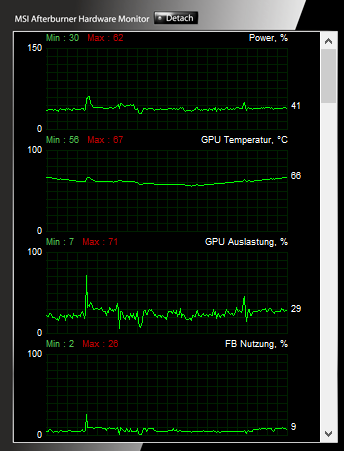 " I'm really looking forward to solve this problem. Maybe some of you have/had the same Problem and fixed it?! "Normal" approach is not necessary because i tried almost everthing casual thing. Advanced help needed! Don't hesitate to ask if something is unclear. Greetz Joschn IGN: Privatkunde
|

|
|
Do you play on Steam? My performance issues stopped as soon as I downloaded normal version of the game.
|

|
|
Does it feel any better when turning vsync on? You mention your FPS peaks around 200fps, and unless you are running at a refresh rate of 240Hz, those extra frames are going to waste anyhow.
Also, are you using lockstep? If you are using lockstep and have latency issues, they can come off like fps issues. "I would have listened... I would have understood!" - Scion
Have you removed Asus ROG/GameFirst yet? |

|
|
First of all, thanks for your replies:
" I'm playing with the normal client. Tried Steam but there is no difference for me. " Tested Lockstep and Predictive. Predictive feels a little bit better. Did a short test with vsync but without any significant improvements. IGN: Privatkunde
|
|
" If you are seeing performance problems when using lockstep, it's often connection related. What does your connection graph look like in the F1 menu? Would you be able post some info when running WinMTR. "I would have listened... I would have understood!" - Scion
Have you removed Asus ROG/GameFirst yet? |
|
" WinMTR: http://pastebin.com/rhd8HjCW Connection graph: 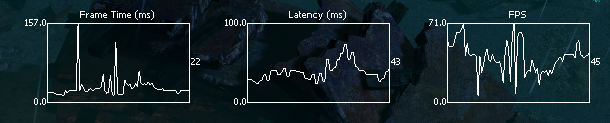 This is only running through docks without crazy *bling blang* and not that many mops. EDIT: This was with Predictive. IGN: Privatkunde Last edited by Joschn#2485 on Oct 23, 2015, 4:35:43 PM
|
|
|
Can't see anything in the MTR that would impact on your gameplay experience, PL in the 7th hop isn't consistent or pronounced so its not likely to be proper loss, average MS is fine, no spiking.
I'd try turning off Vsync and manually locking your FPS to your refresh rate via RivaStats/MSi Afterburner, see if that makes a difference. == Officially Retired 27/02/2019 ==
Massive thanks to GGG for producing such a fun and engaging game, it has taken up faaaaaaar too much of my life over the last 5 years. Best of luck in the future! |

|
" Tested vsync off with capped 60fps, no significant improvements.  Feels bad man... IGN: Privatkunde
|
|
|
Hi,
I have the same problem with my GT750M. The framerate drops and neither the GPU nor the CPU are at their limits. It doesnt even make a difference if I use antialiasing or not and which texture quality I select. FPS and latency looks similar to your first graph. Only thing to get constant FPS is disabling shadows - can you confirm this? Last edited by firefox_tx#1608 on Oct 24, 2015, 6:22:19 PM
|

|
|
Hi there!
Thank you for posting with this concern. Sorry to hear that you have encountered this issue. We have noticed a large number of users encountering issues due to recent changes with nVidia's optimisation tool. If possible, please completely uninstall the GeForce Experience software (this does not have to be a permanent setting, but will be valuable in testing). Once done, please restart your system, and test your performance in game. Please advise us of any changes. Thanks! ✮ Please contact support@grindinggear.com if you need any help!
|



