


Error: Failed writing received data to disk
|
Hi everyone, I have a problem I hope you can solve.
The download crashed several times while trying to download it and now, when there are only 8 MB left I constantly get this error: 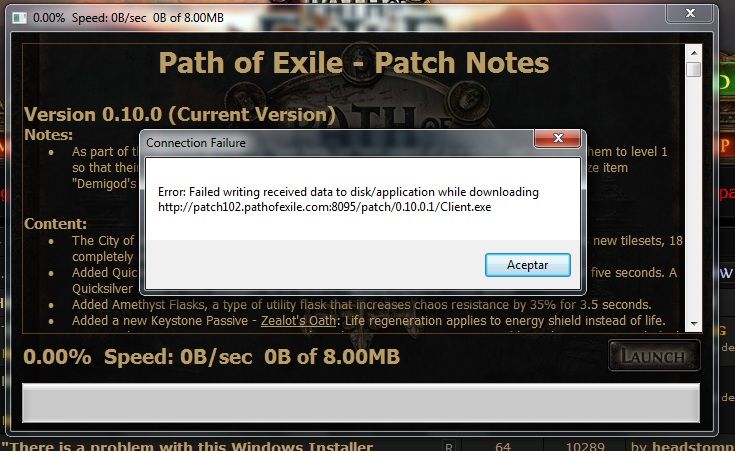 Hope you can help. Thank you. Last edited by Ranhansha#0882 on Jan 23, 2013, 8:29:52 PM
|

|
|
Disk full?
Yllä lohduton taivas, alla hylätty maa. Yksin yöstä kurkotan valoon, vielä huudan: päästäkää minut!
|

|
|
is this the first time it occurred/first time downloading client?
The message is related to disc space, so i recommend changing your default directory to another drive. if you think it may be corrupt in someway, try using this it is a tool used to check PoE for corrupted files http://www.grindinggear.com/PackCheck.exe Last edited by Farmingfish#2584 on Jan 23, 2013, 8:38:09 PM
|

|
|
I have over 33 GB of free space so I don't know why there should be any problem with that :S
|
|
|
Check that you're running the installer as admin, and that it has permission to write files in the place you're installing the game. It is possible that it is trying to put a file somewhere in the same folder or in the Documents/My games folder, and is unable to.
A virus scan or firewall may also be responsible! Balance & Design Last edited by Rory#0000 on Jan 23, 2013, 9:20:00 PM
| |
|
Thank you for your help, everyone. I Just asked my brother to transfer it through an external hard disk.
Just hope this helps anyone though. Thanks a lot everyone ;) |
|
|
I solved this by adding the client to my windows firewall app list :-)
|
|
|
I try to do everthing and i have the same error...
someone help me... what i supose to do. Thanks! Last edited by Cryd#4674 on Jan 26, 2013, 11:48:26 PM
| |
|
Bump, I also have this problem, running as admin and making sure folders are not read only does not help. Still get this error with firewall off.
Edit, just tried it again and it worked correctly. I guess the above fixes worked but my pc needed to think about it. Last edited by _rakk#6179 on Jan 30, 2013, 10:42:36 AM
|
|
|
I had the same problem (just with a different file). Rebooting my PC fixed it... ;)
|
|



