


WinMTR + Videos - Shader/Lag Spikes - Triple, Double Beyond/Simulacrum
|
Most of the Shader/Lag Spikes i had was in Simulacrum and Maps with Beyond it was unplayable for me so i decided to set up my Pc new. Now Double/Triple Beyond is unplayable, you can see it in the Video down below. Simulacrum is playable now.
Triple Beyond test + WinMTR: """"""""""""""""""""""""""""""""""""""""" Video: https://www.youtube.com/watch?v=Gz3AUcz8bNw at 06:20 is the best example, most of the time the Map feels like this. I had to log out because it's unplayable. 1 FPS and 1k MS 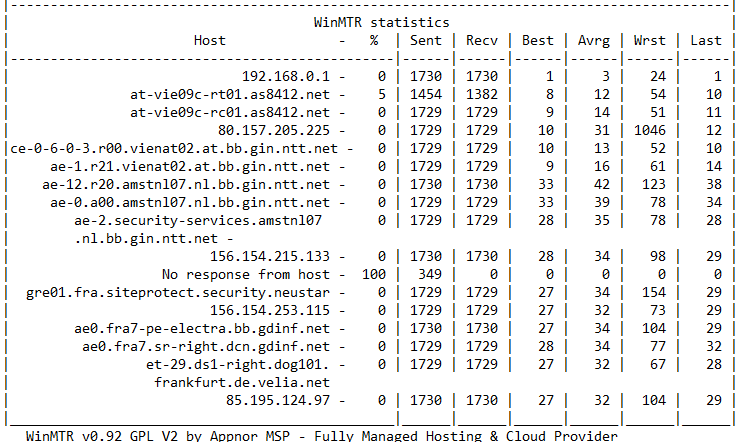 Simulacrum Wave 1-30 Test: """"""""""""""""""""""""""""""""""""""" Video: https://www.youtube.com/watch?v=f6ZpBUszObE While Simulacrum 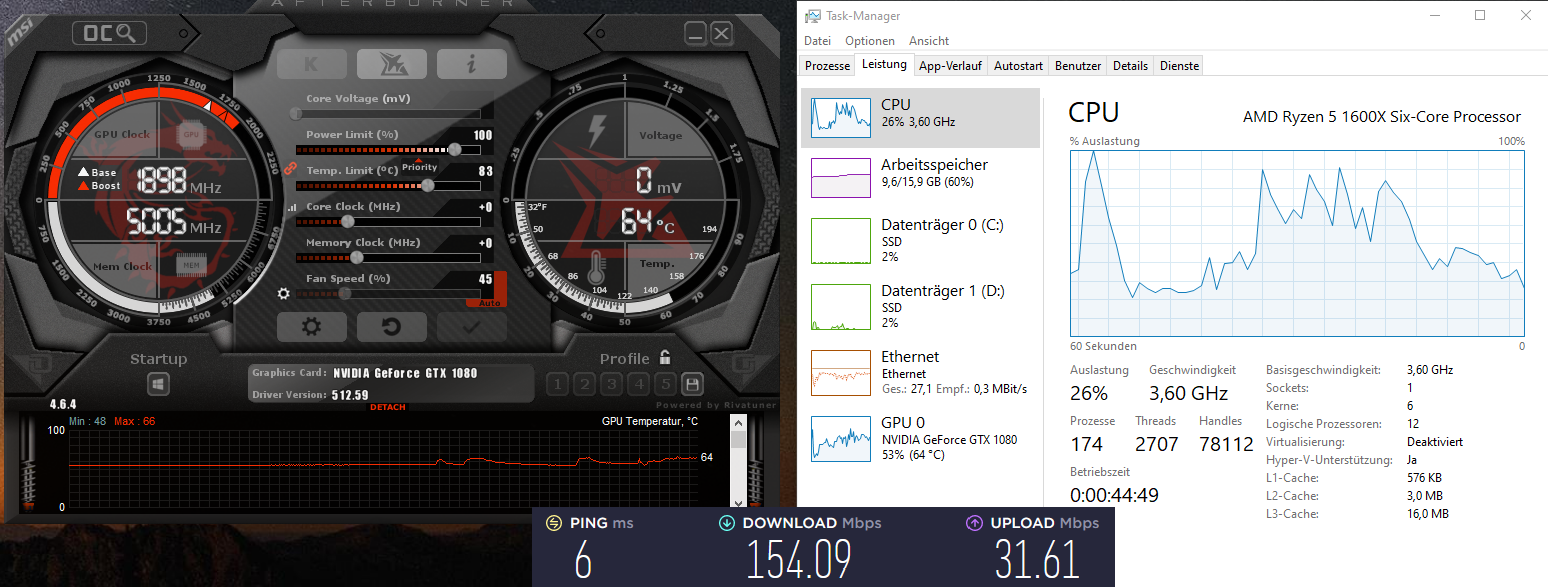 PC Specs: """""""""""""" AMD Ryzen 5 1600X Six-Core Processor 3.60 GHz 16 GB RAM NVIDIA GeForce GTX 1080 (Patch Version 512.59) Windows 10 (Up2Date) 2 SSDs POE on a separate SSD as my OS. Steam Launch Options: """""""""""""""""""""""""""""" --noasync -gc 2 --softwareaudio Ingame: """""""""""" Graphics Renderer: Vulkan or DirectX12 both are fine VSync: Disabled Foreground FPS Cap: 60 Background FPS Cap: 30 Antialiasing Quality: Off Lightning: Shadows Default Shadow Quality: Low (tried no_shadows in the config file) Sun Shadow Quality: Low Bloom: 25% Depth of Field: Disabled Water Detail Level: Low Texture Quality: High Texture Filtering: Trilinear Filtering Graph Details: All Graphs Dynamic Culling: Enabled Dynamic Resolution: Enabled Default Target Framerate: 60 Engine Multithreading: Enabled Default Sound Channel Count: Medium (tried in the config txt ambient_sound/chat_alert/background/music/sound effects/reverb =false) Windows/Nvidia and Shader Caches: """""""""""""""""""""""""""""""""""""""""""""""""""" Graphics settings Hardware-accelerated GPU scheduling - ON Nvidia 3D - Performance Nvidia 3D Options - Power Management Mode - Optimal Performance Nvidia 3D Options - Shader Cache Size - No Limit Nvidia 3D Options - Texturefiltering - High Performance PoE Shader Caches: Deleted Nvidia Shader Caches: Deleted Things I've tried: """"""""""""""""""""""""""" https://www.pathofexile.com/forum/view-thread/3072628 https://www.ghostarrow.com/path-of-exile-increase-fps-performance#1_Best_Graphics_Settings_for_Path_of_Exile https://www.youtube.com/watch?v=Bpme17QAgH8 Last edited by SirGorog#6407 on May 9, 2022, 9:44:44 AM Last bumped on May 12, 2022, 10:13:12 AM
|

|
|
push
|
|
|
GGG doesn't offer TECH support for "the moment" (been like this for several years now). So only chance is if someone in the community can help you.
However my guess is that your CPU and GPU is now "to small" for this contant.... |

|
|
I had no issues since Legacy league(2017-03-03) till Scourge league(2021-10-22), i think it's a setting problem
Last edited by SirGorog#6407 on May 9, 2022, 10:58:33 AM
|
|
|
We need to Support GGG more to get some Technical Support Guys.
|
|
" well no, since that was the promis they made before and then had to admit that lots of PC people money went into first the Xbox client and then later PSN client.... And since TECH support was "stopped" several years ago and profit in company is record high, then that's a lost cost and only give more money to Chris and Tencent where maybe they should invest more in better infrastructure..... Last edited by HanSoloDK#4843 on May 10, 2022, 11:10:48 AM
|
|
|
Well my comment was sarcasm :P
|
|
|
push it to the limit
|
|
|
༼ つ ◕_◕ ༽つ GGG TAKE MY ENERGY ༼ つ ◕_◕ ༽つ
|
|
|
I have the same issue i think. Everything was working solid until recently, where lag in Simulacrums and Blighted maps now reach unplayable levels, like thousands of ms lag.
:( |

|



