


Crash on 1st,2nd,3rd and 4th attempt to enter highgate
|
Hello,
On the firsts attempts to load the game, it crashes when entering highgate or the hideout. I have to reload the game 3 to 5 times before i can play, wich is quite annoying :) Strange thing is that it seems that it only happens with 1 character (my lvl 90 pathfinder) Thank you for your help! Last bumped on Dec 25, 2016, 5:55:14 PM
|

|
|
I've got the same issue since today's patch.. Keeps crashing when farming the lake after 2/3 mins..
|

|
|
It only happens at the beginning of the game for me. No problem while playing
|
|
" add --noasync switch to your PoE launcher shortcut. I assume you have an HDD? It simply can't handle new "assets loading system" and this is why game "hangs up" or crashes for the first time game tries to load everything for Highgate at the time. (i had same issues) Another possible solution is to logout while standing in any other town. Remember, suffering is convenient.
That is why many people prefer it. Happiness requires effort. |

|
|
i have problem too, i cant do anything. just login--come ho--open stash and crash game :<
|

|
" Ok, I think you have the solution... But it's chinese for me. Can you detail a bit more please? - Where exactly do i have to add the --noasync ? - What's an HDD? Thanks |
|
|
I think he's reffering to a steam launch option.
If you're running the game from steam, right-click on it -> Properties ->Set launch options. And that's where you put the --noasync. EDIT: Oh also, when he says HDD he's reffering to your hard drive (Hard Disk Drive). Last edited by Nainpower#2683 on Dec 24, 2016, 8:55:34 AM
|
|
" Steam launcher was explained, here's for standalone client (if you're not playing from Steam) " Yours would be ...\Client.exe" --noasync (or ...\PathOfExile.exe" --noasync or ...\PathOfExile_x64.exe" --noasync) Depends on what was set as a shortcut (end result will still be the same). (Space between " and - is necessary)
bigger image for shortcut properties (Chrome for illustration)
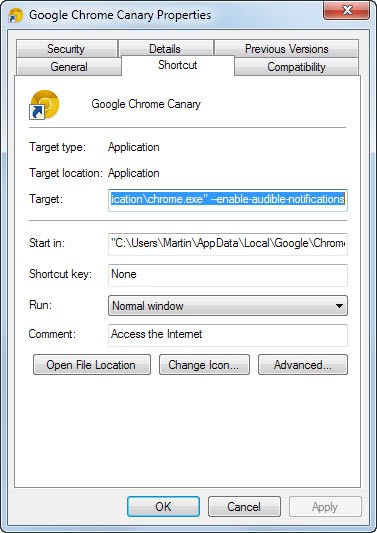 Remember, suffering is convenient. That is why many people prefer it. Happiness requires effort. Last edited by HarukaTeno#6546 on Dec 25, 2016, 1:04:47 PM
|
|
|
Just one word : Thanks :)
|
|



